
V2 Controller OverviewUpdated 2 months ago
The Foil Drive V2 Wireless Controller gives you control of your Foil Drive system and provides real-time telemetry data, along with several customisable settings.
Important: Some controller menu options are intended for manufacturing purposes only. Do not change these settings unless specifically instructed by Foil Drive Support.
Wireless Controller Features
1. Power Button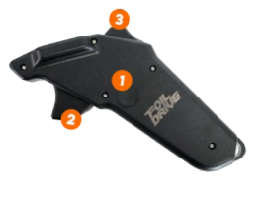
Use the Power Button to:
- Turn the controller on and off
- Scroll through telemetry data with short presses
- Navigate and select options within the controller menu
2. Throttle Trigger
The Throttle Trigger controls the power output of the motor.
Squeeze the trigger to increase motor power and release it to reduce power.
3. Cruise Control Trigger
Advanced Riders Only
The Cruise Control Trigger allows experienced riders to activate and use Cruise Control.
For more information, see Setting Up Cruise Control.
Telemetry Data
The V2 Controller displays real-time information from your Foil Drive system.
Once the controller is turned on and the LCK (Throttle Lock) feature has been released, the screen will automatically display Throttle Percentage.
Use short, single presses of the Power Button to cycle through the available telemetry screens:
- Throttle Percentage
- Motor RPM
- Battery Voltage
- Temperature
- Battery Percentage Remaining
Controller Menu
Accessing the Menu
- Turn the controller on.
- Press and hold the Cruise Control Trigger for approximately 3 seconds to release the LCK feature.
- Continue holding the Cruise Control Trigger and single press the Power Button to enter the menu.
- Once the menu is displayed, release the Cruise Control Trigger.
- Use short presses of the Power Button to scroll through the menu options. The small arrow on the left side of the screen indicates the selected option.
- Long press the Power Button to select an option.
Menu Options
1. Pair
Use this option to pair the controller with your motor.
For instructions, see Re-Pairing the Controller to Your Foil Drive System.
2. Throttle Limit
Default: 100%
Adjustable range: 20–100%
Throttle Limit allows you to set a maximum throttle percentage.
This can be useful for:
- New or learning riders
- Smaller riders who do not require the full power of the system
- Limiting the maximum available power for a particular setup
The Throttle Limit overrides the Cruise Pre-set setting when a lower throttle limit is selected.
For instructions, see Understanding Throttle Limit.
3. Cruise ON/OFF
Default: OFF
Advanced Riders Only
Turns the Cruise Control function on or off.
Warning: Cruise Control is an advanced feature. Only experienced riders who understand how the system operates should use it.
4. Cruise Pre-set
Default: 35%
Advanced Riders Only
Sets the default throttle level used when Cruise Control is activated.
For instructions, see Understanding Cruise Control.
Note: The Throttle Limit setting takes priority if it is set below the Cruise Pre-set value.
5. Battery Serial Number
Assist - 06
Assist PLUS - 08
Assist MAX - 11
Assist SLIM - 11
Assist SLIM Endurance - 08
6. Motor Poles
Manufacturing setting — do not change
This setting is used for manufacturing purposes.
It should always read 07.
7. VESC Communication
Manufacturing setting — do not change
This setting controls communication with the VESC.
It should always be set to ON.
8. Speed Source
Manufacturing setting — do not change
This setting determines the source used for speed information.
It should always be set to VESC.
9. Calibration (Triggers)
Use this option to calibrate the controller triggers.
Trigger calibration may be required if the controller is not correctly detecting throttle or Cruise Control trigger inputs.
For instructions, see Re-Calibrating the Triggers.
10. Throttle Lock
Default: ON
Throttle Lock is a safety feature that prevents accidental activation of the throttle.
When enabled, the throttle must first be unlocked before motor power can be applied.
11. Throttle Lock Time
This setting determines the time before Throttle Lock activates.
For Instructions, see V2 Controller Throttle Lock
Default: 000
Adjust this setting only if required for your particular riding setup or as instructed by Foil Drive Support.