
Understanding the Tilt SensorUpdated 2 months ago
The Tilt Sensor is a safety feature available on Gen2.5 Fusion systems.
When enabled, the Tilt Sensor monitors the orientation of the Foil Drive unit and automatically stops the motor if the unit moves outside the programmed Pitch or Roll limits.
The Tilt Sensor can be:
- Turned ON or OFF
- Adjusted using the Foil Drive Controller
- Individually programmed for Pitch and Roll using the Foil Drive App
How Does the Tilt Sensor Work?
The Tilt Sensor uses an internal sensor to monitor the orientation of the Foil Drive unit.
It monitors two directions: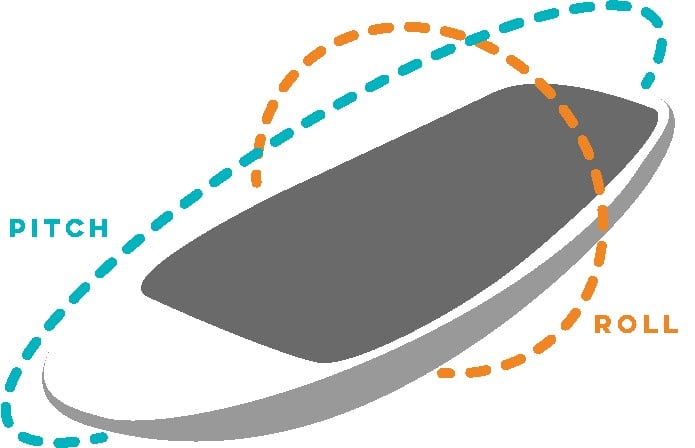
- Pitch – forward and backward tilt
- Roll – side-to-side tilt
If the unit moves beyond the programmed limit in either direction, the system will automatically stop the motor.
For example, if the Tilt Sensor is set to 30° Pitch and 30° Roll, the motor will stop if the unit exceeds the programmed limit in any of these directions.
The Tilt Sensor is a safety feature designed to automatically stop the motor if the board or Foil Drive unit moves outside the programmed orientation range.
Factory Default Setting
The Tilt Sensor is enabled as standard on Gen2.5 Fusion systems.
The default setting is:
- Pitch Forward: 30°
- Pitch Backward: 30°
- Roll Right: 30°
- Roll Left: 30°
This provides a 30° limit in each direction.
Why Does My Fusion Say "LOCK"?
When the Tilt Sensor is enabled, the Fusion system must be in an acceptable orientation before the motor can run.
This means the system may display LOCK when the board is:
- Upside down
- Sitting at an excessive angle
- Outside the programmed Pitch or Roll limits
This is normal operation.
Preparing Your Gen2.5 for Riding
When preparing your Foil Drive:
- Assemble the Foil Drive and board normally.
- Turn the board the correct way up.
- Position the board so it is sitting level, for example on the front foil and tail.
- Turn on the controller.
- Unlock the controller if required.
- Allow the unit to recognise that it is within the programmed tilt range.
- Confirm that the LOCK indication has cleared.
- Test the throttle only once the system is ready to operate.
Warning: Do not test the motor while the board or unit is upside down or in an unsafe position.
What Happens if the Tilt Limit Is Exceeded?
If the motor is running and the unit moves outside the programmed Pitch or Roll range, the Tilt Sensor will automatically stop the motor.
Once the unit returns within the programmed range, the motor will not automatically restart.
To restart the motor:
- Return the Fusion unit to within the programmed tilt range.
- Release the throttle completely.
- Return the throttle to 0%.
- The system can then be started normally.
You must release the throttle and return it to zero before the motor can be restarted after a Tilt Sensor cut-off.
This prevents the motor from automatically restarting while the unit is still outside its safe operating orientation.
Turning the Tilt Sensor ON or OFF
The Tilt Sensor can be switched ON or OFF through Menu 7 – Tilt Sensor on the Foil Drive Controller.
To change the setting:
- Enter the controller menu.
- Navigate to Menu 7 – Tilt Sensor.
- Select ON or OFF.
- Confirm the selection.
- Exit the menu.
The Tilt Sensor can also be switched ON or OFF through the Foil Drive App or on the V3 Controller.
The Tilt Sensor is a safety feature. We recommend keeping it enabled unless you have a specific reason to disable it.
Adjusting Pitch and Roll
The Foil Drive App allows you to set the Pitch and Roll limits independently.
This allows you to customise the Tilt Sensor to suit your riding style, experience level and equipment.
For example, a rider learning to e-foil may choose a tighter Roll limit so the motor stops if the board is tilted significantly to one side.
An experienced rider may prefer a wider range to allow for more aggressive riding, steep waves or sharper turns without triggering the Tilt Sensor.
Example Settings
Beginner rider:
- Lower Roll limit for a more restrictive safety range
- Moderate Pitch limit
Experienced rider:
- Wider Pitch and Roll limits
- Greater freedom for aggressive turns and steeper riding
There is no single setting that is appropriate for every rider.
Only increase the Tilt Sensor limits if you understand the effect this has on the safety function. Wider limits allow greater board movement before the motor automatically stops.
When Should I Adjust the Tilt Sensor?
The factory 30° Pitch and Roll setting is suitable for many riders and is a good starting point.
You may want to adjust the settings if:
- You are learning and want a more restrictive safety range.
- You are experiencing unwanted motor cut-outs during normal riding.
- You regularly ride steep waves.
- You use aggressive turns or a large angle of roll.
- Your riding style requires a wider range of movement.
If the Tilt Sensor is activating unexpectedly, consider whether the programmed limits are appropriate before disabling the feature completely.
Important Safety Information
The Tilt Sensor is designed to help stop the motor when the Foil Drive unit moves outside the programmed orientation range.
However, it should not be relied upon as the only safety feature. Always follow normal Foil Drive safety procedures and ensure the throttle is released whenever you are not intentionally operating the motor.
Never deliberately test the Tilt Sensor while holding or handling a running propeller. The demonstration of this feature should only be performed using appropriate safety precautions.
Quick Reference
| Feature | Description |
|---|---|
| Tilt Sensor | Safety feature that monitors Fusion orientation |
| Pitch | Forward and backward tilt |
| Roll | Side-to-side tilt |
| Factory Setting | 30° Pitch and 30° Roll |
| Motor Cut-Off | Activates when the programmed limit is exceeded |
| Restart After Cut-Off | Return to range and release throttle to 0% |
| Controller Menu | Menu 7 – Tilt Sensor |
| App | Turn Tilt Sensor ON/OFF and adjust Pitch/Roll individually |